inference-atlas is the atlas in your terminal. It answers one question the website makes
you work for: what is worth running on my box, and how do I set it up?
It identifies the hardware you deploy to, ranks every measured configuration by whether it would actually run there, draws the sweep curves and latency distributions as terminal charts, and turns any run into a Markdown install recipe an agent (or you) can follow — pinned weights, install commands, the exact serve command, every flag explained, the traps the original contributor hit, the numbers to expect, and the steps to verify it and contribute your own measurement back.
It reads the same compiled data the website reads, so it is never out of date with it, and it works offline once it has synced.
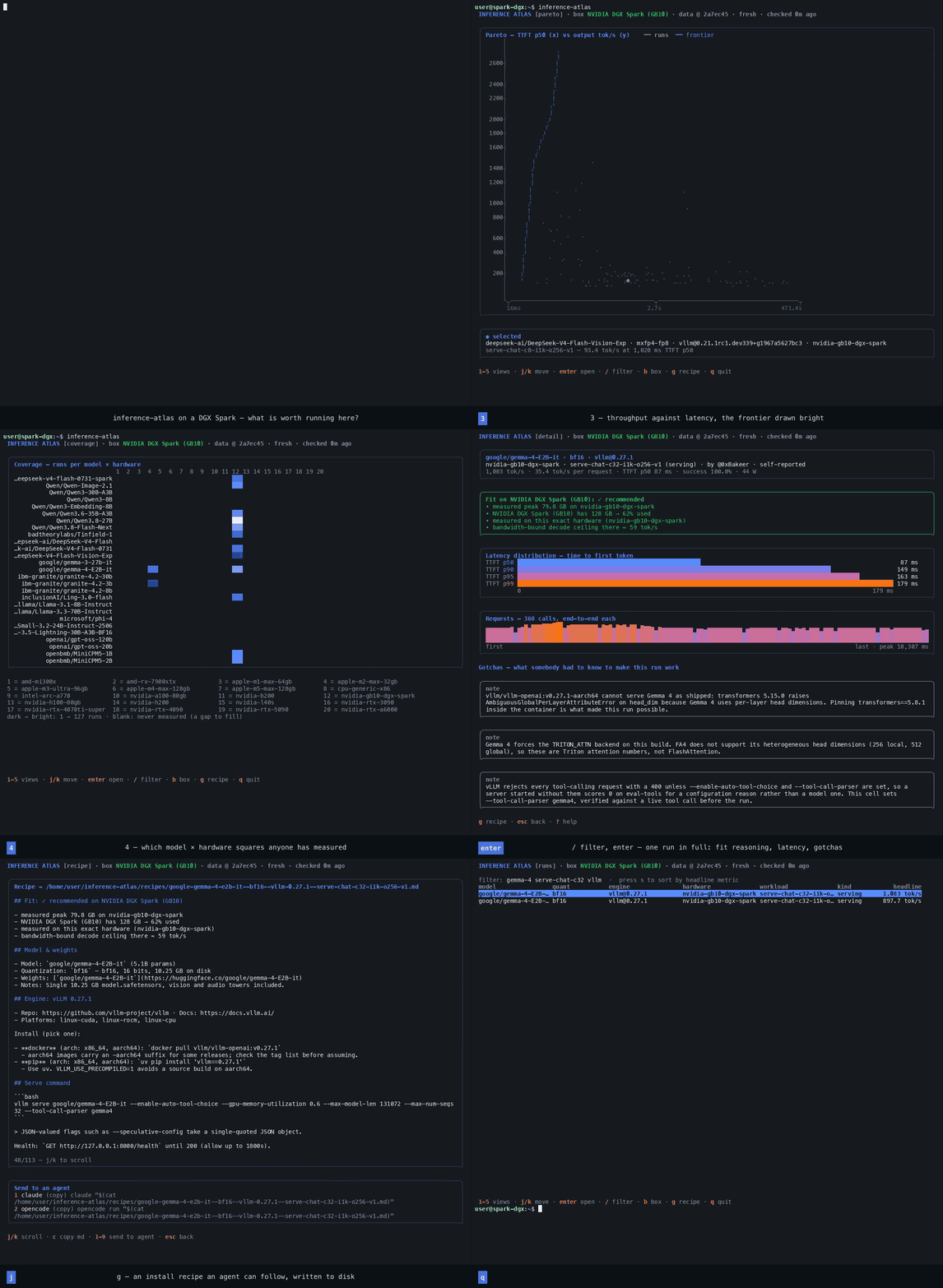
The main screens have a short recording next to them in this manual; the full set, and how
they were made, is in media/.
Contents
| Installation | Requirements, the one-line installer, from a checkout, updating, uninstalling |
| Getting started | Your first five minutes, end to end |
| Keyboard reference | Every key, in every view |
| The views | What each screen shows and what it is for |
| The target box | Detection, picking hardware, device counts, how fit verdicts are decided |
| Reading the charts | Braille plots, latency ramps, request columns, the coverage map, colour modes |
| Recipes | Generating them, what is in one, sending them to an agent, the verify loop |
| Configuration | Every key in config.toml, and every path the app touches |
| Data and syncing | Where the numbers come from, how updates work, offline behaviour |
| Command line | Flags, exit codes, using it in scripts |
| Troubleshooting | When something looks wrong |
| Development | Module map, tests, how to add a view or a chart |
The shape of it in one screen
┌ INFERENCE ATLAS [target] · box NVIDIA DGX Spark (GB10) · data @ 46e00af · fresh ┐
│                                                                                │
│  1  target      what is worth running on your box, ranked by fit               │
│  2  runs        every measurement in the atlas, filterable                     │
│  3  pareto      throughput against latency, with the frontier                  │
│  4  coverage    which model × hardware squares anyone has measured             │
│  5  hardware    pick your box and how many devices  (also: b)                  │
│                                                                                │
│  enter          open the selected run in full                                  │
│  g              turn it into an install recipe                                 │
│  ?              help                                                           │
└────────────────────────────────────────────────────────────────────────────────┘
Three things worth knowing before you start
Every verdict is about a box you chose. The app detects the machine you are sitting at, but that is only a first guess — you tell it which hardware you actually deploy to, and how many devices. See The target box.
It never guesses a number. Where a figure is measured, it says measured; where it is derived, it says estimate; where it cannot be known, it says so and leaves it blank. That is the same rule the atlas itself runs on, and it is why the fit verdicts are worth reading.
Nothing leaves your machine without you. The app fetches public data over HTTPS and writes files under your home directory. The only outward action it can take is opening a browser to a pre-filled issue form, and it asks first, showing you exactly what the link carries.
See also
packages/tui/README.md— the package overviewAGENTS.md— the contribution contract every recipe restatesdocs/SPEC.md— ids, fingerprints, the result file, the shard contract